Analysis
4035 Views •Operational Guide
3687 Views •Analysis from Reordering Rule Created/Updated
3565 Views •Getting started
3491 Views •Features
3463 Views •Operational Guide
3382 Views •Operational Guide
3359 Views •Operational Guide
3354 Views •Concluding points
3317 Views •Terminologies
3308 Views •Auto Process for Reordering Rule
3291 Views •Create Reordering Rule (Manual)
3278 Views •Operational Guide
3269 Views •Update Purchase - Sales - IWT History (Manual)
3253 Views •Features
3238 Views •Features
3174 Views •Features
3052 Views •Update Purchase - Sales - IWT History (Manual)
Update Sales History or Purchase History or IWT History
To Update the Sales History / Purchase History / IWT History that is considered while calculating accurate Minimum Quantity & Maximum Quantity manually navigate to
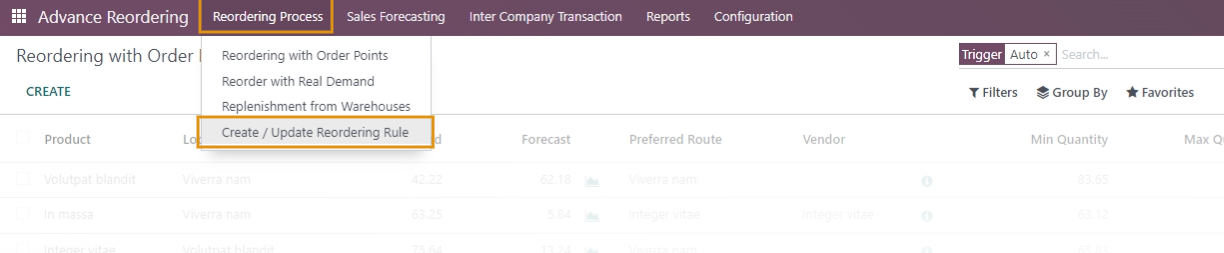
- Reordering Process / Create/Update Reordering Rule

Select either Sales History or Purchase History or IWT History Operation in the wizard that opens as shown below.
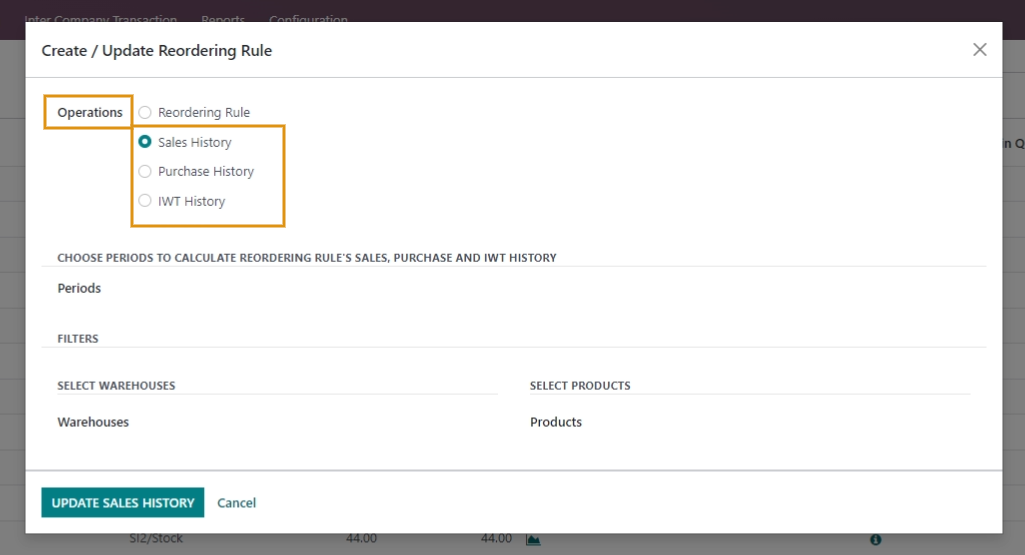
Choose Period to calculate Sales History or Purchase History or IWT History of Reordering Rule.
For either of the cases select the Warehouses and products for which you wish to Update your Sales History or Purchase History or IWT History.
Update the Sales History or Purchase History or IWT History.
Please Note:
1. If no warehouses and Products are selected then Sales History, Purchase History, or IWT History of reordering rules will be Updated for all products and all Warehouses.
2. This is a manual method to create/Update the Reordering rule.
3. By default, the reordering rules will be updated in Automated Method after the time period set in Configuration Settings.
Commenting is not enabled on this course.